


Tanarat Shutter Photo // Shutterstock
How to choose accounts payable software in 2026
If you’re a controller evaluating how to choose accounts payable software, the challenge is picking a tool that’ll still fit your invoice volume, entity structure, approval needs, and month-end close process six months from now. The cost of a poor fit compounds quickly. Rebuilding a workflow, retraining approvers, and absorbing implementation fees a second time can easily outpace any short-term savings from your first choice. Vendor demos can look polished, so your job is to determine which tool is most likely to keep pace with how your team actually works.
Many finance leaders start by asking, “Which vendor is best?” Taking a different approach gets you further in your evaluation. Start with these three questions instead:
- Which architecture fits your operating model?
- How deep of an enterprise resource planning (ERP) integration does your general ledger (GL) require?
- Which accounts payable (AP) software requirements will your AP team still value 18 months from now?
A feature checklist can help with screening. A structured evaluation can help answer those questions. This article from Brex lays out a practical framework for choosing accounts payable software based on the criteria that often distinguish durable fits from short-term fixes. You’ll find evaluation criteria grounded in controller priorities, a step-by-step process with a payback model, the architectural decisions some guides move past quickly, and the mistake patterns that push teams to switch tools later. The goal is an evaluation process that holds up when invoice volume rises, entities expand, and close pressure increases.
Key takeaways
- Before you even start comparing vendors, decide whether you need a standalone AP tool or an integrated spend platform. Sometimes the problem is simply invoice processing. Other times, the real issue is managing spend across multiple platforms.
- A structured, multi-step evaluation process that includes a scenario-based demo, a real-world pilot, and a payback model takes longer than a quick vendor comparison, but it’ll dictate whether your chosen platform still fits a year or two from now.
- Getting IT, procurement, approvers, and other stakeholders on board matters just as much as building your financial case, because their buy-in ultimately determines successful adoption.
6 things that matter most when evaluating AP software
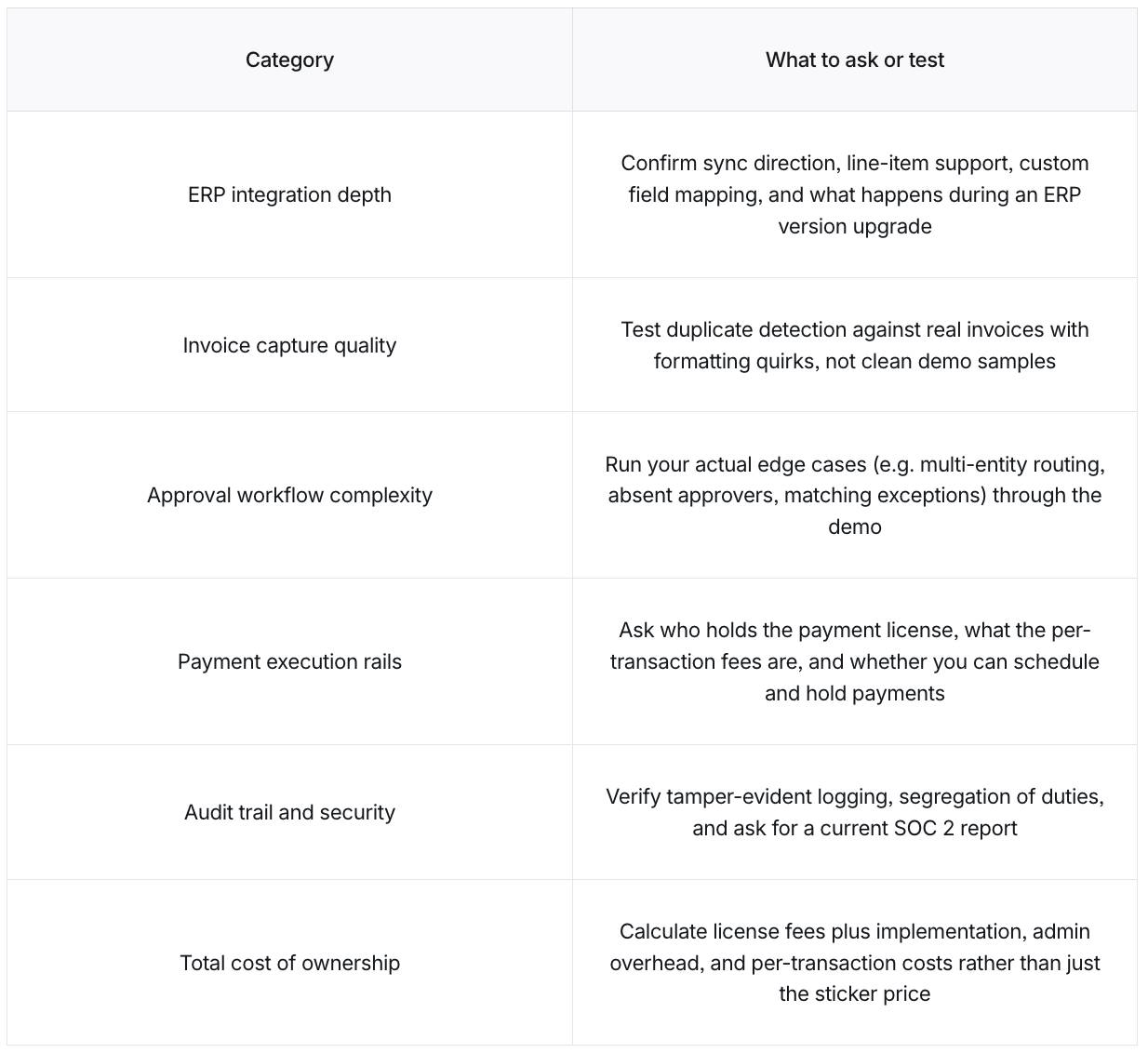
Switching AP tools within a year or two of implementation happens often enough that it’s become a recognized issue in the industry instead of an occasional misstep. Most of these replacements trace back to a few avoidable mistakes, and the criteria in this section help you catch them before you sign a contract. The table below summarizes what to ask or test for each one, so you can bring this into your own vendor conversations.
Brex
ERP integration depth
The difference between AP software that reduces work and AP software that just moves it around often comes down to integration depth. Integration depth measures how deeply the tool connects to your chart of accounts, approval chains, and invoice population. It matters early on because it often shapes close quality, reporting accuracy, and day-to-day workload. A tool that depends on a weekly manual export can still leave your team doing integration work by hand.
Before signing, finance teams typically need answers to specific questions about sync direction, line-item support, custom field mapping, sync frequency, and what happens during an ERP version upgrade. Vendor timelines for ERP integration often run longer than initially quoted, so consider building in buffer time before go-live. A scenario-based demo of a two-way sync using a test invoice with custom fields can show whether the tool will reduce close friction or just move it around, whether your general ledger runs in Sage Intacct or a comparable ERP.
Invoice capture depth
Once integration clears that bar, capture quality becomes the next filter, because it determines how much manual work remains after implementation. Some tools auto-code by vendor, GL account, cost center, and department, and catch duplicates before they hit the payment queue. However, a platform that captures invoice data accurately but still requires your team to assign GL codes or check for duplicates doesn’t actually simplify anything. The evaluations that catch this run duplicate detection against real-world formatting variations, such as invoices that differ only in spacing, date format, or vendor name casing, rather than clean demo samples. That usually reveals more about what day-to-day effort will look like than a polished demo, and it is the same discipline behind good invoice matching once volume climbs.
Approval workflow complexity
After capture, the approval workflow design determines whether invoices keep moving or stall due to exceptions. Approval workflows need to reflect how decisions actually happen inside the business, and they should mirror whatever your written accounts payable policy already spells out. Controllers who test this well bring real edge cases from their own organization into the demo instead of relying on the vendor’s script, cases like these.
- An invoice routed by entity, cost center, and GL code at the same time
- A high-value invoice requiring two sequential sign-offs while the first approver is out for five days
- A two-way matching exception where only one line item doesn’t match the purchase order within tolerance
Ardent Partners’ State of ePayables 2025 report, based on a survey of 204 AP professionals, found that invoice exceptions are the second-most common challenge AP teams face, cited by 48% of AP leaders. Evaluations that hold up tend to run platforms against the organization’s actual invoice population instead of curated demo samples. A tool that handles these cases in the standard UI without professional services is more likely to hold up as your process grows.
Payment execution rails
Once an invoice is approved, payment execution affects cash flow timing and the platform’s real cost. Many buying guides list automated clearing house (ACH), check, wire, and virtual card as capabilities, but the controller’s real questions usually go deeper. Before signing, you should know these things:
- Whether the vendor holds the payment license or relies on a banking partner
- Whether virtual card rebates are passed to the buyer, and at what percentage
- What the per-transaction fees are by rail
- Whether you can schedule and hold payments, or the platform releases on its own cadence
Ardent Partners’ 2025 report notes that payment timing should be actively managed as a strategic cash management tool, especially given the current cost of capital. Payment flexibility shapes working capital, and it is worth weighing right alongside convenience. The strongest evaluations ask each vendor to walk through exactly how a held payment or a same-day release actually works inside their system.
Audit trail with segregation of duties
As payments move, control evidence matters just as much as execution. The tool should include a tamper-evident transaction log that captures the exact timestamp and user identity for submissions, approvals, rejections, GL coding changes, and payment releases. It should also enforce separation of duties within the tool itself, with configuration in the UI and no professional services required. Changes to vendor banking details should trigger a separate approval workflow with its own audit logging, since a clear audit trail is considered a standard control against internal fraud. That kind of log pairs naturally with disciplined accounts payable document management, so auditors can trace a transaction back to its source invoice.
The platform’s activity log is only part of the picture. Data protection is the rest of it, and a current SOC 2 Type II report is the usual starting point, alongside a clear answer on how the vendor handles data encryption and incident response. Controllers who take this seriously verify these controls in a live demo scenario rather than a slide deck, since control claims only matter if the team can rely on them during close and audit.
Total cost of ownership, including rebuild risk
Control depth still doesn’t answer the buying decision on its own, because the real cost shows up long after implementation. License fees are a single line item in the total cost of ownership calculation. Meanwhile, per-invoice and per-transaction fees compound quickly at scale, ongoing platform administration adds headcount, and the possibility of switching in a year or two due to poor fit means absorbing implementation costs twice.
Data migration, ERP integration testing, workflow configuration, user training, and change management are implementation cost components that often exceed estimates. Controllers who factor in future effort often evaluate vendors differently from teams focused solely on license fees, which is one reason it pays to revisit accounts payable best practices before writing evaluation criteria. Accounting for the total cost of ownership up front can prevent a cheaper contract from becoming a more expensive tool.
The decision you need to make before comparing AP vendors
Before evaluating vendors, you should answer a bigger question first. Should you use a standalone AP tool, or a broader spend platform that includes AP? Many guides on choosing accounts payable software skip this because those vendors have already made that choice for their own products. You haven’t, so your evaluation will be stronger if you answer that question first.
When a standalone AP tool is the right answer
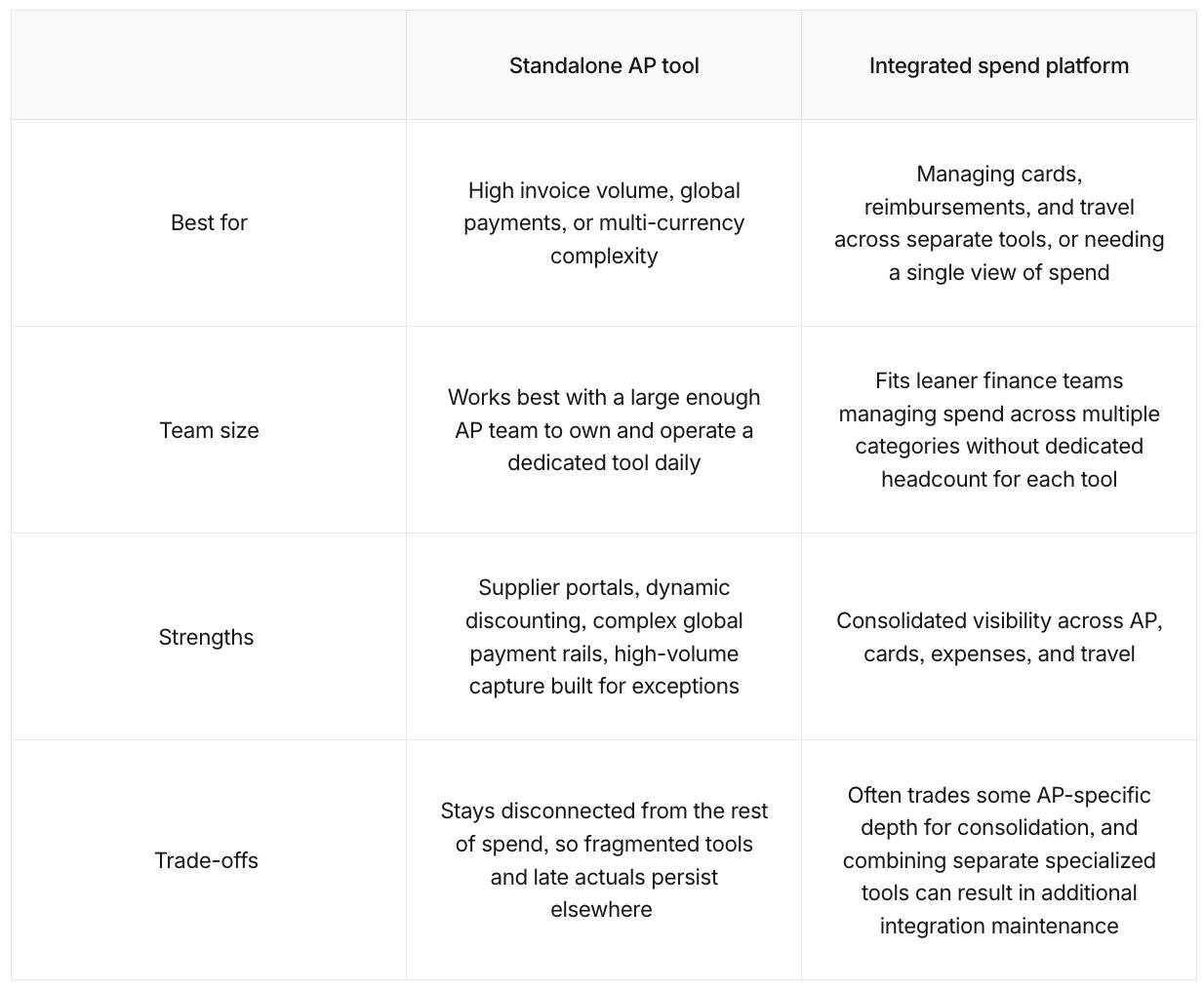
A dedicated AP platform often works best when AP complexity is the dominant problem, particularly for organizations with a large enough AP team to own and operate a dedicated tool daily. Think of it as buying depth for one workflow, instead of breadth across several. A standalone tool makes sense in a few situations, including the following.
- High invoice volume, where the depth of exception handling determines throughput
- Global supplier payments, multi-currency compliance, or supplier onboarding as central workflows
- An ERP that’s already the system of record, where AP is the only workflow being automated, so a standalone tool keeps the scope tight
When an integrated spend platform solves more
The calculus changes when the pain spans several spend workflows at once, and AP is only one piece of it. The tell is usually where the delay in your close actually comes from. An integrated platform can be a good fit in scenarios such as these.
- The controller manages cards, expense reimbursements, and travel across separate tools and wants consolidated visibility.
- The primary pain is late actuals caused by fragmented spend across tools, since solving AP in isolation won’t close that gap.
- A lean finance team manages overhead from too many point tools and needs one platform with a full view of spend.
- Budget-versus-tracking needs to reflect AP spend in real time.
The real trade-off: Depth vs. consolidation
Each option comes with trade-offs. Depth here means fewer workarounds for the AP-specific edge cases that a generalist platform might not anticipate. Standalone AP tools often carry deeper AP-specific capabilities, like these.
- Supplier portals
- Dynamic discounting (paying invoices early in exchange for a supplier discount)
- Complex global payment rails
- High-volume capture engines built for exception-heavy invoice populations
Using specialized tools for each function, sometimes called “best of breed,” also reduces your dependence on any single system. But ICAEW’s professional guidance notes that tightly integrating those tools can undo the benefit, and managing several separate tools also means juggling multiple contracts and support relationships, a cost that’s easy to underestimate. That overhead rarely shows up on a vendor’s pricing page, so it is worth naming explicitly during your evaluation.
Integrated platforms may trade some of that depth for consolidation, giving the controller a single view across AP, cards, expenses, and travel. Neither approach is right for every case. Your goal is to figure out which option best addresses your pain points.
Here’s how the two approaches compare across the factors that matter most.
Brex
How to choose the right AP software without cutting corners
Keep in mind that a vendor demo is only one input in your evaluation. Many teams shortlist a few vendors, sit through demos, and pick the one that looks best. However, that approach optimizes for time spent evaluating rather than the total cost and impact of the decision. If the platform turns out to be a poor fit, the cost shows up later, as implementing a new tool, retraining approvers, and absorbing fees a second time all add up. A faster process postpones that risk, but it doesn’t eliminate it completely.
1. Map the current process and quantify the pain
Controllers who run a disciplined evaluation start by documenting how invoices are processed in the business today, before they ever talk to a vendor. From there, the baseline usually includes the company’s current cost per processed invoice, the average number of days it takes to process a standard invoice, and the month-end AP close time in staff hours. These three metrics matter because they capture the full cost of the process, including how long invoices take to process and how much staff time gets absorbed at close.
Quantifying the pain also means identifying where the process actually breaks down, so the tool gets chosen based on real problems instead of a general sense that things are slow. That usually shows up as a count of how many invoices get stuck for manual review each month, how often approvals stall waiting on a specific person, and how often duplicate or mismatched invoices show up. Controllers who bring those counts into the first vendor call get further than those who describe the problem as too much manual work.
The Ardent Partners 2025 study found that top-performing AP teams process invoices at $2.65 each in 2.9 days, while all others process invoices at $12.42 each in 13.5 days. Treat that gap as the ROI test every vendor needs to pass. If they can’t show how their tool closes it, the business case doesn’t hold up.
2. Factor in stage and complexity
Once you have that baseline, the next filter is whether a tool matches your current stage. Volume and complexity are useful screening criteria before any demos run. If you’re still managing AP with spreadsheets or general accounting software, that is a normal starting point when evaluating options. Just make sure to choose a platform that fits your needs rather than overcomplicating things, whether that means accounting software built for a midsize business or something leaner.
Lighter-weight tools often fit lower invoice volumes, while higher-volume teams benefit more from automation. IFOL’s 2025 AP Automation Trends report found that teams processing 5,000 to 10,000 invoices a month spend more than five days on the task without automation. Mostly automated teams completed that same volume in two days.
Multi-entity and multi-currency businesses add a different kind of complexity, since AP software for growing companies needs to handle separate entities, currencies, and consolidation correctly. This is where venture-backed companies planning multiple entities tend to confirm this capability before scheduling a single demo, since it is often left out of vendor claims, including specifically how the platform keeps intercompany eliminations and multi-currency revaluation out of a manual spreadsheet.
3. Shortlist based on ERP integration first
After stage fit, integration should further narrow the list. An efficient shortlist starts with confirming which tools have a verified, maintained, native integration with the company’s existing enterprise resource planning (ERP) platform. An integration-first filter eliminates vendors before scheduling a single demo and can save weeks of evaluation time.
Confirming an integration exists isn’t enough on its own, however, since a shallow integration can create as much manual work as no integration at all. The questions below reveal that gap, and how a vendor answers them can tell you a lot before you ever sit through a demo. A vague answer, or one that doesn’t account for your exact ERP version, are two of the more common sources of wasted evaluation time for mid-market controllers.
Bring these questions into AP vendor conversations.
- Does the integration sync both directions, or only pull data one way?
- Does it move line-item detail, or just invoice totals?
- Can custom fields be mapped? If so, how much configuration does that take?
- How often does the sync run, and what happens when our ERP gets a version upgrade?
4. Test workflow fit with a scenario-based demo
Once the shortlist is limited to tools that can actually connect to your ERP, the demo should test workflow fit under pressure. Controllers who run a tight process should give every vendor the same five invoices.
- A standard vendor invoice
- A multi-entity invoice split across two entities with different GL codes and approval chains
- An invoice with a missing PO
- A high-value invoice requiring two levels of sequential approval
- A foreign-currency invoice with a rate variance against the PO
What matters is clicks, systems touched, and manual steps required for each, since that reflects daily effort more than whether the invoice is eventually approved. Vendor demos use clean, well-formatted invoices, while real invoices will often include handwritten notes, inconsistent formats, missing purchase order numbers, and supplier-specific quirks. Testing the platform against that reality tells you more than a polished tour does, since workflow fit is what actually determines cycle time.
5. Bring in stakeholders early
AP tools usually affect more than finance, so getting buy-in from the right people matters just as much as picking the right vendor. IT typically needs to confirm security and integration requirements, procurement may need to review the contract terms, and the ERP admin needs to sign off on the integration itself before implementation can start. Budget owners and approvers belong in that group too, since their day-to-day buy-in affects whether the platform is actually used long after launch.
The evaluations that avoid surprises loop stakeholders in before the pilot starts, not after a vendor has already been picked, since discovering a blocking requirement after the fact can turn what should have been a four-week timeline into a three-month one. Stakeholders weigh in on the questions relevant to their own role while vendors are still being evaluated, rather than reviewing a decision that has already been made. People who help choose the vendor tend to buy in more strongly, since they have shaped the decision instead of just being told about it.
6. Pilot with real invoices and real approvers
A strong demo still isn’t enough, because approver behavior and sync reliability often show up more clearly in production. A two- to four-week pilot using a real invoice subset and actual budget owners as approvers can surface what a demo won’t show as clearly, including approver resistance, GL coding errors, ERP sync failures, and edge cases the vendor didn’t anticipate. A vendor who won’t support a structured pilot like this reveals something, too, and that response is worth treating as evaluation data in its own right.
A structured pilot, one that includes enough invoices and at least one full accounting reconciliation, produces real numbers instead of vendor promises. The evaluations that hold up track five metrics throughout the pilot.
- OCR accuracy, or the tool’s ability to read invoice data correctly
- Auto-match rate
- Exception rate
- Approval cycle time
- ERP sync error rate
7. Build a payback model before deciding
The pilot should feed directly into the financial case for the decision. A payback model built from the following steps shows how long it will take for the tool’s savings to cover its cost.
- Multiply labor savings per invoice by annual invoice volume.
- Add the extra early-payment discounts you’d capture with the new tool, compared to today.
- Add the late-payment penalties you currently pay that the new tool would prevent (pulled from your actual AP and GL records rather than estimating).
- Subtract from that total the annual license fee, the implementation divided across your standard amortization period, and the ongoing cost of keeping the ERP integration running.
- Divide the result by 12 for a monthly payback period.
Presenting a net present value (NPV), the value of those future savings in today’s dollars, over your standard time horizon, can give the CFO a fuller picture than a payback period alone. Accounting treatment, control design, and financial evaluation should align with your company’s policies and, where appropriate, with advice from qualified professionals. A concrete payback model gives the CFO a number to evaluate and gives the evaluation team a shared benchmark, which can accelerate internal buy-in faster than a vendor comparison table.
4 common mistakes to avoid when choosing accounts payable software for your business
Many AP software replacements trace back to a selection process that emphasized the wrong criteria. Four patterns recur in industry research, and each one can be addressed during your evaluation. Each shows up in the same place, in the gap between what the demo promised and what daily use actually delivers.
Evaluating features instead of workflow fit
A feature-led selection often looks solid until the day-to-day process starts. Teams discover that setup requires months of configuration, or that daily work takes more manual steps than the process it replaced. The gap usually appears between the demo and the lived workflow.
Part of the problem is that feature checklists no longer tell you much. Most vendors in this space now claim the same core capabilities, so a checklist comparison often makes platforms look nearly identical. Instead, consider assessing tools by how well they handle your specific edge cases. Your evaluation anchor should be your actual invoice flow tested through the scenario-based demo and pilot, with the vendor’s capability matrix as a secondary reference.
Treating ERP integration as table stakes
A lot of AP vendors list “ERP integration” as a feature without explaining what that means in practice. Some connect in real time and sync details down to the invoice line item. Others just export a file once a day that someone on your team still has to import manually. Both get labeled “integration,” but only one of them actually takes work off the team’s plate. Evaluations that catch the difference verify integration depth in a live environment during the pilot and confirm that the vendor can support the company’s specific ERP version through future upgrades, rather than trusting the label on a feature list.
Ignoring approver experience until after go-live
Even when integration works, adoption can stall if approvers avoid the tool. Most evaluations focus on integrations and features, and very little on the people who’ll actually use the tools every day, even though adoption ultimately determines your ROI. If budget owners find the approval interface painful, they often revert to email, and the AP software can end up functioning primarily as an invoice-capture tool.
Approver experience is best judged by actual non-finance users during the pilot rather than by the AP team running it. Controllers who catch adoption problems early hand department managers and cost center owners the mobile approval experience and measure their completion rates, since that is the clearest early signal of whether cycle time will actually improve after go-live. A tool that scores well with AP but poorly with approvers rarely delivers the cycle-time improvement the business case promised.
Treating AP in isolation from the rest of spend
Approver friction can also be a sign of a bigger problem. A tool that only handles invoices, separate from reimbursements and travel, creates a fragmented spend picture at month-end. The controller then has to manually consolidate across tools, which adds work back into the close. For some organizations, the real pain sits upstream of the invoice entirely, in budget commitments made across departments before finance ever sees a bill. When the pain point lies that far upstream, AP software alone will not solve the issue, no matter how well it performs. An integrated spend platform is built for exactly this problem, since it gives finance visibility into spend as it happens instead of only after the invoice arrives. Broader efforts to automate accounting processes often start with AP for exactly this reason.
When to hire and when to automate your AP function
The decision to hire another AP specialist or invest in better tooling typically comes down to one question: Where does the bottleneck come from? If the problem is a broken process, another hire won’t fix it. Use the signals below, together with guidance from your appropriate professional advisor, to help inform your decision.
Automate if:
- Your AP specialist spends more time chasing approvals than processing invoices
- Your cost-per-invoice hasn’t decreased as invoice volume has grown
- Cycle time is driven by approval bottlenecks rather than pure volume
- Your exception rate is above 18.4%, the industry average reported by Ardent Partners
Hire if:
- Invoice volume has outpaced what one specialist can process, even with automation in place
- Exception volume consistently requires human judgment that tooling can’t handle
- Your AP manager spends time on transactional work instead of oversight
If you get mixed answers, automate first. A better-configured platform usually reveals whether you actually need a hire.
FAQs about choosing accounts payable software
What should I look for when choosing accounts payable software?
Six requirements matter most when choosing accounts payable software. These are ERP integration depth with two-way, line-item sync, invoice capture quality through auto-coding and duplicate detection, an approval workflow tested against real edge cases, payment rail flexibility, an audit trail with enforced segregation of duties, and total cost of ownership that accounts for implementation, per-transaction fees, and rebuild risk.
What is the difference between AP software and AP automation software?
AP software handles invoice management and payment processing through manual or semi-manual workflows. AP automation software adds intelligent capture, auto-coding, approval routing, and payment execution with less manual intervention. Most tools marketed as “AP software” include some automation features, but the depth of automation varies significantly across vendors, particularly in GL coding accuracy and exception handling.
How long does AP automation software take to implement?
Implementation timelines depend on tool category and ERP complexity, and integration testing often takes longer than vendors estimate. The full evaluation, from mapping your process through signing the contract, usually takes longer than a quick demo-based decision as well, since testing real workflows and piloting take time. Confirm the implementation plan, integration testing process, and post-upgrade maintenance ownership before you sign.
How much does accounts payable automation software cost?
Pricing ranges widely by category and volume, but remember that license fees are only one part of the calculation. Also confirm implementation costs, integration maintenance, platform administration overhead, and any per-invoice or per-transaction charges that compound at scale. Total cost of ownership is the number that matters for the buying decision.
Should I use a standalone AP tool or an integrated spend platform?
Standalone AP tools fit when invoice volume is high and AP complexity, particularly exception handling and supplier management, is dominant. Integrated spend platforms fit when the controller manages fragmented tools across cards, expenses, and bill pay, and needs consolidated visibility. Match the tool to your pain points before evaluating individual vendors.
This story was produced by Brex and reviewed and distributed by Stacker.