

nottallart // Shutterstock
How to reconcile an accounts payable ledger
Many finance teams have a working accounts payable process. Invoices get entered, approved, and paid on schedule. But a process that runs smoothly isn’t the same as someone actually checking what goes on behind the scenes, and that makes basic questions hard to answer. How much does the company actually owe right now? Which invoices are overdue? Does the accounts payable balance in the general ledger (GL) match the accounts payable aging report? Most teams can only answer these with confidence at close.
As Brex explains below, the accounts payable ledger closes that gap. When it’s well maintained, you can pull it at any point in the month and get a current view of where things stand. That makes errors easier to trace and fix when they’re still small, and you’ll have an answer ready when a board member or lender asks what the company currently owes.
Key takeaways
- The AP ledger is the vendor-level detail behind your GL’s single accounts payable total. In a well-maintained ledger, the sum of open vendor balances should equal the GL control account balance.
- The AP ledger, GL control account, and AP aging report are three related but distinct reports. The ledger holds every transaction, the GL shows one total, and the aging report re-sorts open items into time buckets. The AP aging total and the GL AP control account should tie, and the open-balance total in the AP subledger should tie to both.
- Reconciling weekly, rather than only at month-end, can help catch errors while they’re still traceable to a single transaction.
What is an accounts payable ledger?
The accounts payable ledger, also called the accounts payable subledger or subsidiary ledger, is the detailed record of vendor payables activity, organized at the individual vendor and transaction level. It captures invoices received, credit memos issued, payments made, and outstanding balances for each vendor.
The general ledger only shows a single accounts payable total. The accounts payable ledger contains the vendor-level detail behind that number. In a well-maintained set of records, the sum of open vendor balances in the AP ledger should equal the accounts payable balance in the general ledger, consistent with the control-account relationship.
What an AP ledger entry contains
A single accounts payable ledger entry typically includes the date, vendor name, invoice number, transaction amount, and due date, along with the related debits and credits. In a well-maintained vendor ledger, fields are populated consistently. Vendor records match the vendor master, invoice references stay consistent, and dates reflect the underlying transaction. Those fields make the ledger searchable, reconcilable, and useful when something looks off.
How do finance teams use the AP ledger?
The accounts payable ledger supports a few different jobs, and at growing companies, the same person often handles more than one of them. The ledger is used for transaction-level accuracy and reconciliation, for cash-flow forecasting, and to give auditors a way to trace general ledger balances back to source documents. Because the same ledger can support all of these jobs, data quality problems can spread quickly once they appear.
Using the ledger for reconciliation and accuracy
Finance teams use the accounts payable ledger to confirm that posted invoices and payments are reflected accurately, that the accounts payable subledger ties to the general ledger control account before close, and that any discrepancy can be traced to a specific transaction. Skipping regular checks means relying on month-end reconciliation to catch problems that could have been found earlier. The accounts payable process breaks down when the ledger isn’t treated as a living record. Waiting until close can turn a short review into a longer investigation. Regular reviews can catch errors while they’re still traceable to a single entry.
Using the ledger for cash forecasting and audit readiness
The same ledger data that supports reconciliation also feeds cash-flow forecasting and working capital reporting. Tracking the right accounts payable metrics starts with clean ledger data, which makes cash planning more credible because the payable balance is more likely to reflect what the company actually owes. That same consistency pays off at audit time as well. A ledger with consistent vendor records, complete invoice references, and linked payment records turns audit preparation into more of a retrieval exercise instead of a reconstruction project.
What’s the difference between the AP ledger, GL control account, and AP aging report?
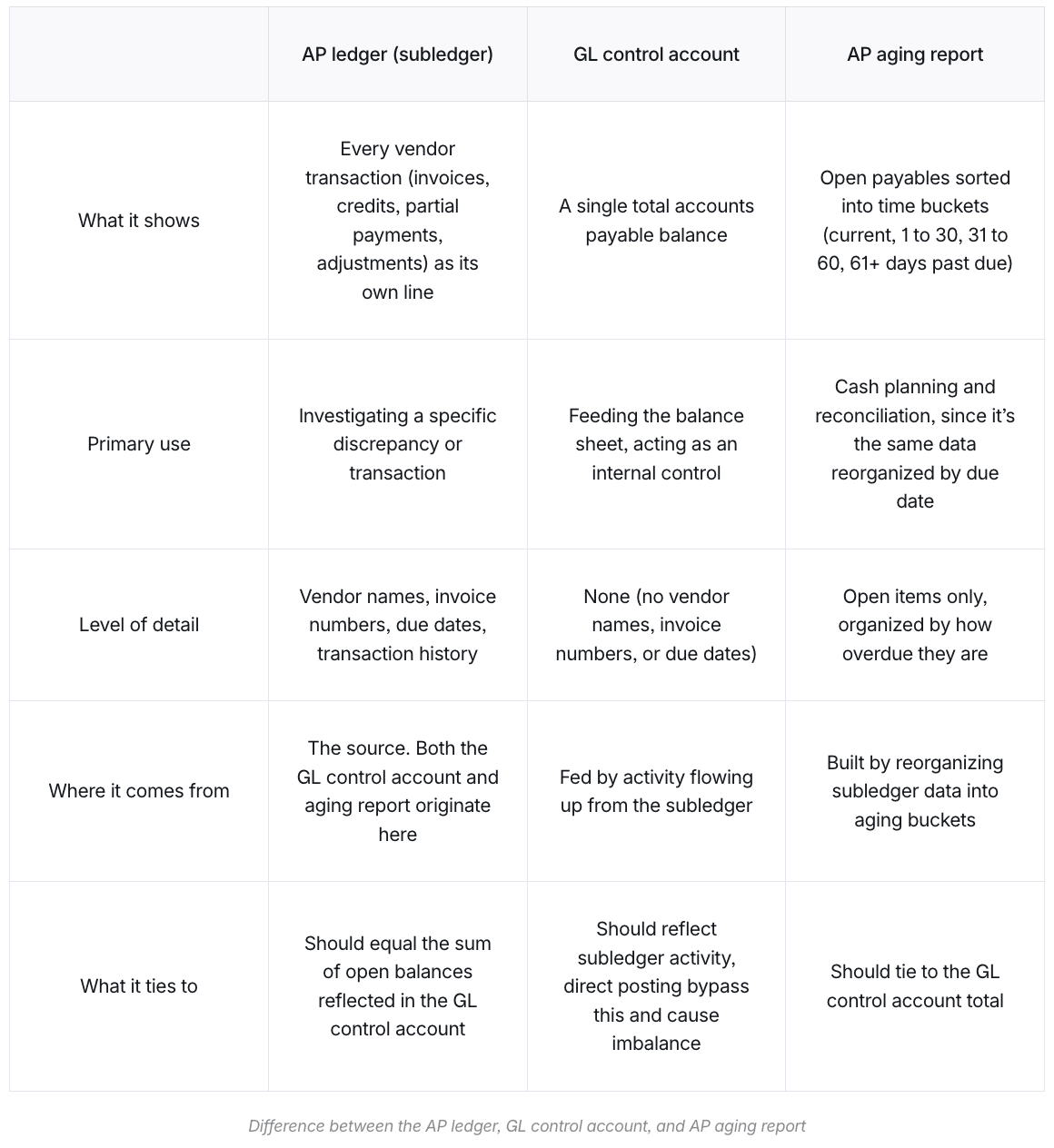
These three terms are related but distinct, and finance teams work with all three regularly. Blurring them together can make a reconciliation problem harder to diagnose. The table below keeps their purposes clear, so it’s easier to find the source of a variance when something doesn’t work out.
Brex
The AP ledger (subledger)
The accounts payable subledger records transactions with vendors. Each invoice, credit, partial payment, and adjustment appears as a separate line. It’s the source of detail for what you owe and to whom. Both the accounts payable aging report and the entries flowing to the general ledger accounts payable control account originate here. If something looks wrong in either of those two places, the investigation often starts in the subledger.
The GL control account
The general ledger includes a single accounts payable control account that shows only the total accounts payable balance. There are no vendor names, invoice numbers, or due dates. Its job is to feed the balance sheet and act as an internal control check. Direct postings can create reconciliation issues when they bypass normal AP workflows or omit vendor-level detail, depending on the system. The general ledger balance should reflect activity flowing up from the subledger, which is why direct postings deserve close review.
The AP aging report
The accounts payable aging report reorganizes the accounts payable subledger’s open payables into time buckets such as current, 1-30 days past due, 31-60 days, and 61 days or more. In a well-maintained ledger, the aging report total ties to the general ledger control account. When it doesn’t, the investigation often starts in the subledger. Because it’s built from the same underlying data, the aging report also feeds near-term cash planning, which is why keeping it accurate supports both reconciliation and forecasting.
How to use an accounts payable ledger
Complete, current entries make the accounts payable ledger reliable for reconciliation and cash forecasting. Even small gaps can surface as discrepancies at close, and tracing them backward usually takes more time than preventing them. Using the ledger well comes down to recording activity promptly, applying transactions correctly, preserving audit history, and reviewing the detail before problems stack up.
Record each invoice at the moment it arrives
Create the ledger entry as soon as the invoice arrives and is approved for entry. Delayed entry creates timing gaps that complicate vendor statement review and later payment matching. Populate every field completely and consistently as you record it. The standard invoice entry is a debit to the relevant expense or asset account and a credit to accounts payable, depending on the nature of the purchase. A clean vendor management process prevents data-quality problems at the source.
Match each payment to the invoices it covers
Apply each payment against the specific invoices it covers so the vendor record closes cleanly. A payment left as a general credit leaves open items behind and makes the aging detail harder to read. The standard payment entry is a debit to accounts payable and a credit to cash.
Enter each credit memo, void, or adjustment as its own ledger line
Enter each credit memo as its own line in the accounts payable ledger and apply it against the related open balance. A separate line preserves the transaction history in the subledger instead of overwriting the original invoice record. Handle voids and reversals the same way, so the audit history stays intact as the balance returns to zero. Because treatment varies by company policy and period-close procedures, consult your accounting team or a qualified accounting or tax professional when deciding how to record adjustments.
Review the AP ledger weekly
Review the ledger against the general ledger control account on a recurring weekly schedule. Pull the accounts payable aging detail or vendor balance report from your accounting software, compare the total to the general ledger accounts payable balance on the same basis, and investigate any variance before it accumulates. Variances caught earlier are easier to trace than those discovered at close, after more transactions have posted. While you review, scan for past-due and unpaid invoices, open credit memos not yet applied, and zero-balance items that should be closed.
This doesn’t require a dedicated AP hire or a large block of time. For a lean team, a standing 30-minute check each week is usually enough to catch a variance before it compounds, and it also serves as your review step when there’s no separate person to check your work. AP automation can flag many of these patterns automatically, which matters most when there’s no extra headcount to absorb the manual review.
How to reconcile the AP ledger to the general ledger
Reconciling the accounts payable balance in the general ledger to the subledger detail helps you confirm the number is accurate. The four steps below provide a structured way to find and fix discrepancies. Running them on a recurring schedule keeps each review manageable and makes unusual activity easier to isolate.
1. Generate both reports on the same basis
Pull two reports from your accounting software as of the period-end date. You need the accounts payable aging detail (or vendor balance report) and the accounts payable balance from the balance sheet. Report names vary by accounting system, but every major platform has an equivalent to both. Run both reports on an accrual basis as of the same date. Keep in mind that aging reports and balance sheets are only comparable when they’re run on the same basis. Aging reports are almost always accrual-basis by design, since aging tracks unpaid, invoiced amounts, which is a concept that doesn’t exist under cash-basis accounting. If your balance sheet is set to a cash basis, confirm that it is switched to accrual before comparing the two.
2. Compare the totals
The accounts payable aging detail total and the general ledger accounts payable balance should be equal when both reports are run on the same basis and as of the same date. If they differ, record the difference before doing anything else. A round-number variance may point to a single transaction or posting pattern. A $5,000 variance, for example, may trace back to one invoice or one manual entry rather than several compounded errors. Meanwhile, a variance that matches a recent journal entry may point to a direct posting to the control account. If a $12,000 adjustment was booked directly to accounts payable last week and the variance is also $12,000, that could be the source. Capturing the variance first keeps the investigation focused on a specific problem instead of a general review.
3. Investigate using a structured sequence
Start by confirming that both reports are on an accrual basis, use the same period-end date, and pertain to the same entity in a multi-entity accounting environment. A mismatch on any of those dimensions can create a variance that disappears once the reports are aligned. Next, search for journal entries posted directly to the accounts payable control account. A direct posting is typically easy to spot because it skips vendor-level details like vendor names, invoice numbers, or due dates that a typical AP entry would carry. Then check for unposted or partially posted batches. You’ll also want to look out for cutoff errors like invoices dated in the prior period but entered in the current period, or payments dated in the current period but related to a different reporting cutoff. Working through the variance in a fixed order can keep the review from turning into a broad, unfocused hunt.
4. Post correcting entries
Correct variances through the appropriate module. If an invoice was posted to the wrong period, many teams reverse and re-enter it in the correct period. If a payment wasn’t applied, a common remediation step is to apply it to the open invoice. Document what the variance was, what caused it, and what was corrected. The accounts payable reconciliation workflow extends this to vendor statement matching and accrual review. Because correction methods can depend on your accounting policy, close calendar, and tax considerations, consult a qualified accounting or tax professional before making material adjustments. If reconciling your AP ledger to the GL every period eats time your team doesn’t have, consider automating your manual reconciliation process with an accounts payable software platform.
How to fix common AP ledger mistakes
Accounts payable ledger problems usually show up in repeatable patterns. The issues below often account for many of the subledger-to-general-ledger variances finance teams encounter at close. Once you recognize the pattern behind a variance, the fix becomes faster, and it gets easier to address the process weakness causing it before it shows up again next period.
Posting journal entries directly to the AP control account
A direct journal entry to the general ledger accounts payable account can update the general ledger balance without creating the same vendor-level subledger detail you’d expect from an AP module entry. A common remediation step is to reverse the direct entry and re-enter the transaction through the accounts payable module when appropriate. Most accounting systems don’t require the same vendor-level fields on a direct journal entry that they’d require on a standard entry, which is why this kind of posting often creates a gap instead of catching it at the source. Re-entering through the module keeps the source detail and control account aligned, rather than relying on cleanup at close.
Entering invoices with inconsistent or missing vendor data
An invoice entered under a slightly different vendor name can create a separate vendor record and fragment the vendor’s outstanding balance. “Bluewater Supply,” “Bluewater Supply Co.,” and “Bluewater Supply Inc.” might all describe the same vendor, but if each shows up as its own entry, that vendor’s activity gets split across three records instead of one, with no single view showing what’s actually owed to them. Regular vendor master review and a standard naming convention at setup help reduce that risk.
Fragmented vendor records can also make duplicate payments harder to spot. Preventing duplicate payments in accounts payable starts with a clean vendor master. A few minutes of setup work upfront is much easier than untangling duplicate records once they’ve already spread across a reporting period.
Leaving payments or credits unapplied against specific invoices
A payment or credit posted to a vendor without being matched to the intended invoice can leave open items behind and distort the aging report. A common remediation step is to open each unmatched payment and apply it to the invoice it should clear. The fix is often simple, but the longer an unmatched item sits, the more it distorts the aging detail and the harder it gets to trace back to the right invoice. Clearing unapplied items quickly keeps forecasting and close work more reliable.
Relying on month-end reconciliation to catch mid-month problems
A timing difference identified early in the month is often easier to investigate than the same difference found closer to the end, after more activity has posted around it. A standing recurring review of the accounts payable subledger-to-general-ledger balance is one of the more practical accounts payable best practices you can put in place. The routine matters because consistency keeps a small variance from turning into a close-delay problem.
Keep your accounts payable ledger accurate
The most common issues that finance teams run into with AP ledgers will repeat every close if nothing upstream changes. A clean accounts payable ledger can give finance teams a current view of what the company owes, whether the general ledger balance is reliable, and where to investigate before close gets harder. For lean finance teams, that means faster reconciliation, better cash visibility, and fewer surprises heading into month-end.
Disclaimer: This article reflects Brex’s perspective at the time of publication and is intended for general informational purposes only. It is not intended as legal, tax, accounting, or financial advice. Laws, regulations, and guidance may vary based on your specific circumstances, and interpretations or outcomes may differ. Information may also change over time. Before making any decisions, you should consult your own qualified legal, tax, accounting, or financial advisors.
This story was produced by Brex and reviewed and distributed by Stacker.